Know what needs your attention.Keep the next step connected.
Keep follow-up tasks tied to the client, inquiry, tour or deal behind them. Return to open work, find its context and mark it complete when it is done.

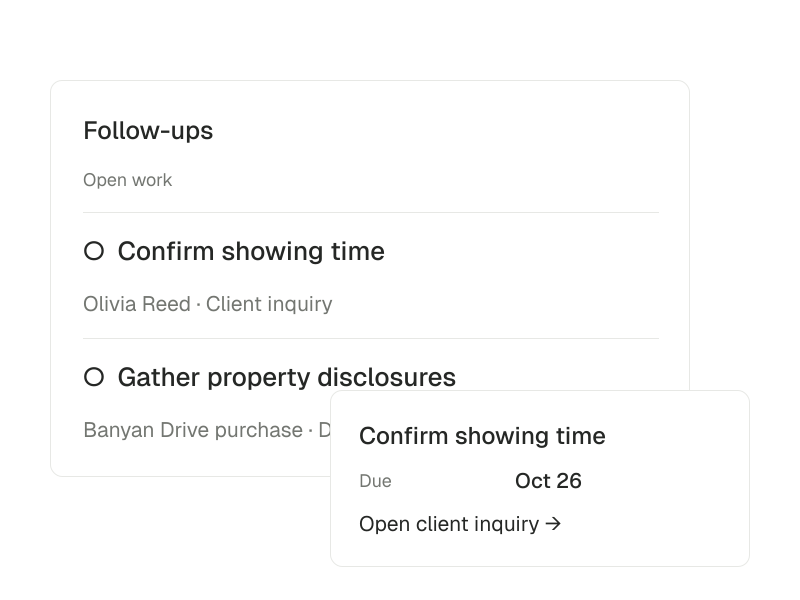
Follow-ups · Open task
Confirm showing time
- Due
- Oct 26
- Contact
- Olivia Reed
- Source
- Client inquiry
Keep the next action visible.Return to the right context.
Move from the work in view to one specific action, with its person and timing attached.
- 01
Find the outstanding work
Open Follow-ups from Inbox to see the tasks that still need attention.
- 02
Go to the relevant record
Open the linked inquiry, client, tour or deal before taking the next step.
- 03
Close the loop
Mark the task complete once the work is done.
Tasks with context
Link a follow-up to the person, inquiry, tour or deal it belongs to.
A view of open work
Find outstanding tasks in the Follow-ups view inside Inbox.
Due dates that stay with the task
Set a due date and keep the reminder tied to that task as its timing or status changes.
Completion you can record
Mark a task done and keep the list focused on work that still needs attention.
Follow through on the conversation.
A new inquiry can lead to a conversation, an appointment or a document task. Keep the follow-up linked to the record that explains why it matters.
Read the documentationWorking with follow-ups
Agent-led follow-ups require activated automation. Your task list remains available for review.